OAP to retired person

What!! you don’t have a car?  But how do you get around?

Posted in Uncategorized | Leave a comment

Yandex

I have discovered yandex.com which has web based email (very fast and simple) , it also has yandex.disk a cloud storage solution with 11GB of storage for free. yandex.disk is like Onedrive or Google drive to use.

yandex

yandex.disk also comes with a desktop client or smartphone app, there is even one for my Lubuntu linux.

Overall this is a wonderful free service. yandex.com is also a search engine and has other parts like maps etc.

Highly recommend by me.

Only one problem so far, when I sent myself an email, yandex to outlook.com, the email was put in spam by outlook. Just typical MS I suppose.

Yandex N.V. is a Russian multinational technology company specializing in Internet-related services and products. Yandex operates the largest search engine in Russia with about 60% market share in that country. according to Wikipedia Stock is quoted as YNDX (NASDAQ) Customer service: 1 (617) 398-7870 Headquarters: Moscow, Russia Founded: 2000 Founders: Arkady Borkovsky, Arkady Volozh, Ilya Segalovich, Elena Kolmanovskaya

Posted in Uncategorized | Leave a comment

Lubuntu 16.04 April 2016

Lubuntu 16.04 April 2016

It’s April 2016 and I have just installed a clean version of the latest Lubuntu.

  • Turned off Light Locker (menu item under preferences does not work, but turned it off in Default apps for LXSession)
  • Turned on Other software partners
  • Activated Additional drivers & wi-fi

Firefox

prefs

  • General, Privacy preferences etc.
  • included add-ons for Ublock, LastPass, BetterPrivacy
  • imported bookmarks from backup

Restored backups

Software

  • Pulse audio
  • Skype
  • Grsync
  • Gimp
  • Viewnior
  • HP lip
  • LibreOffice writer
  • Gwrite (not now in repository, but found the deb and after installing python-support it works)
Posted in Uncategorized | Leave a comment

Lubuntu

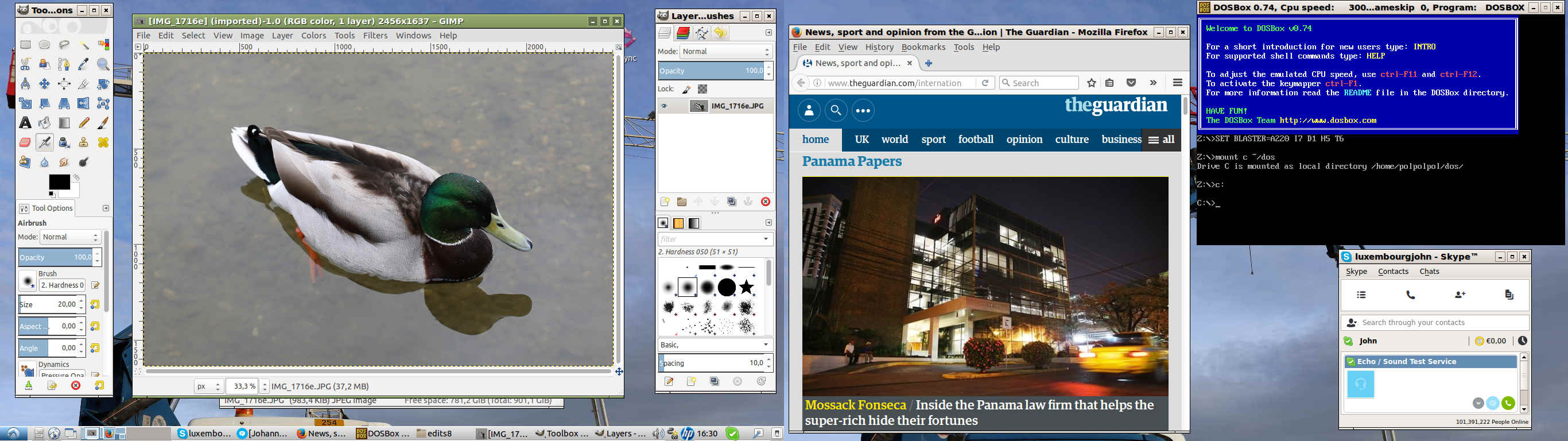
Here is my Lubuntu one PC two screens

2 screens

Posted in Uncategorized | Leave a comment

Change to Linux, update

Lubuntu

December, 2015

I am now using Lubuntu 15.10 which I find to be very stable and easy to use.

Have stopped using Quicktime under Wine to edit .mov files from my camera and now use Openshot. This is a good solution for editing and splicing .mov or any other video files. Titles and transitions may be added, also the results can be rendered to a number of formats including for example suitable for Youtube or Vimeo.

For HTML and CSS editing I normally use the text editor. Sometimes, however, a WYSIWYG app is useful. An online tool is available at http://www.quackit.com/ which is useful, also sometimes use Gwrite:

Gwrite is an HTML format text editor.

Features:

  1. HTML5 file format
  2. Standard word processing user interface
  3. Content structure oriented word processing
  4. Title style table of contents production
  5. Similar navigation/documentation views in Microsoft Word
  6. Paragraph selection when double or right click in navigation view
  7. Word count: for document or selections, count the words(with and without spaces), paragraphs, lines, English words, Chinese characters.
  8. Images inclusion via Base64 

Gwrite includes some default styles, so I normally compose some stuff and then copy the body section to my own template to produce the html file.

For posting to the web Filezilla is perfect.

I quite like Viewnior image viewer as it also shows EXIF data.

Have sometimes used gedit text editor.

Openshot, Gwrite, Filezilla, Viewnior and Gedit are all available from the Lubuntu repository so installing them is easy.

Posted in Uncategorized | Leave a comment

bye bye

IMG_0764e

starting to demolish villa “Adagio”

Posted in Uncategorized | Leave a comment

Change to Linux

Lubuntu

March, 2015

With the end of life of XP and also my old Pentium dying I decided it was time to change to Linux permanently.

I acquired a Lenovo g500 Corei3 8GB RAM 1TB HDD for about £300 from Amazon. This came with Windows8. Played with it for a bit, thought it was a bit sluggish, tried to upgrade to 8.1 but the installation stalled. Got fed up pretty quickly, changed the UEFI to legacy OS and removed optimization for Windows and installed the 64bit version of Lubuntu from CD.

Having previously played around with various distros I chose Lubuntu as it is lite and has a simple interface.

Installed Skype and Gimp. Gimp is the equivalent of Photoshop and I use it for cropping, resizing and the occasional tweaking of my photos. Bye the way, I connect my 6D and x100s using the USB cables without any proprietary software from the makers. I like using the cable connection as it saves ware and tear on the card. The card comes up in the file manager.

Use Grsync to incrementally copy files to an external HDD, its very fast.

Lubuntu comes with Abiword as word processor which is fine, I also use MS Word on line via my outlook.com account also the OneDrive is useful.

Audacious is good for listening to mp3 files of for example Podcasts. The VLC player is great for viewing DVD’s.

Editing .mov files from the cameras can be done using QuickTime running in Wine the Windows emulation for Linux.

The browser which comes with Lubuntu is Firefox which works fine.

Finally, I can log into Second life using the 64bit version of Firestorm viewer which runs without a hitch.

So far there is nothing I can’t do in Lubuntu that I could do in Windows, so I am very happy.

Posted in Uncategorized | Leave a comment

demolition

see some of my photos of  a local building site

IMG_0623e

Posted in Uncategorized | Leave a comment